This is a global configuration. You need to find it in Edit→ProjectSettings→AttributeSystem and edit it. Attribute relationships primarily correspond to the influence relationships between Primary attributes and Base attributes (or Special attributes). For example, 1 point of Strength increases 10 points of Physical Attack, etc.
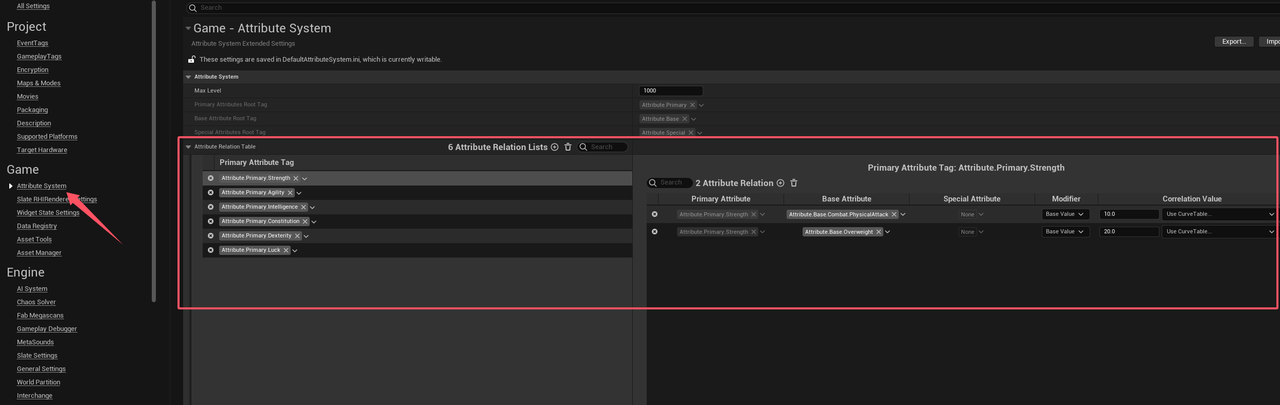
This is a data table design. The left side is the list of primary attributes, and the right side shows all the relationships associated with a specific primary attribute. You can change it through specific values, or use the curve table on the far right to make coordinated changes. The calculation mode for specific value changes: 1 Strength = +10 Physical Attack; if a curve table is set, it becomes: 1 Strength = +10 * the curve table value (current level).
Utility Functions:
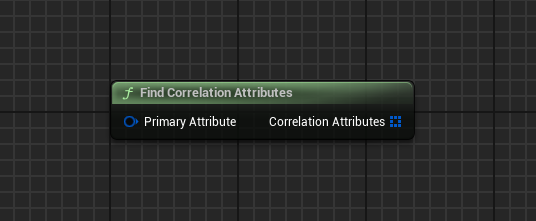
FindCorrelationAttributes
Used to find all associated attributes of a specified primary attribute. (That is, the content in the above configuration.)
Comments
Share your thoughts and discuss with everyone