Attribute Data Asset ASAttributeDataAsset
The basic attribute information configuration of the attribute system is defined through the ASAttributeDataAsset data asset. You can create one by right-clicking in the Content Browser panel -> Attribute System -> ASAttributeDataAsset.
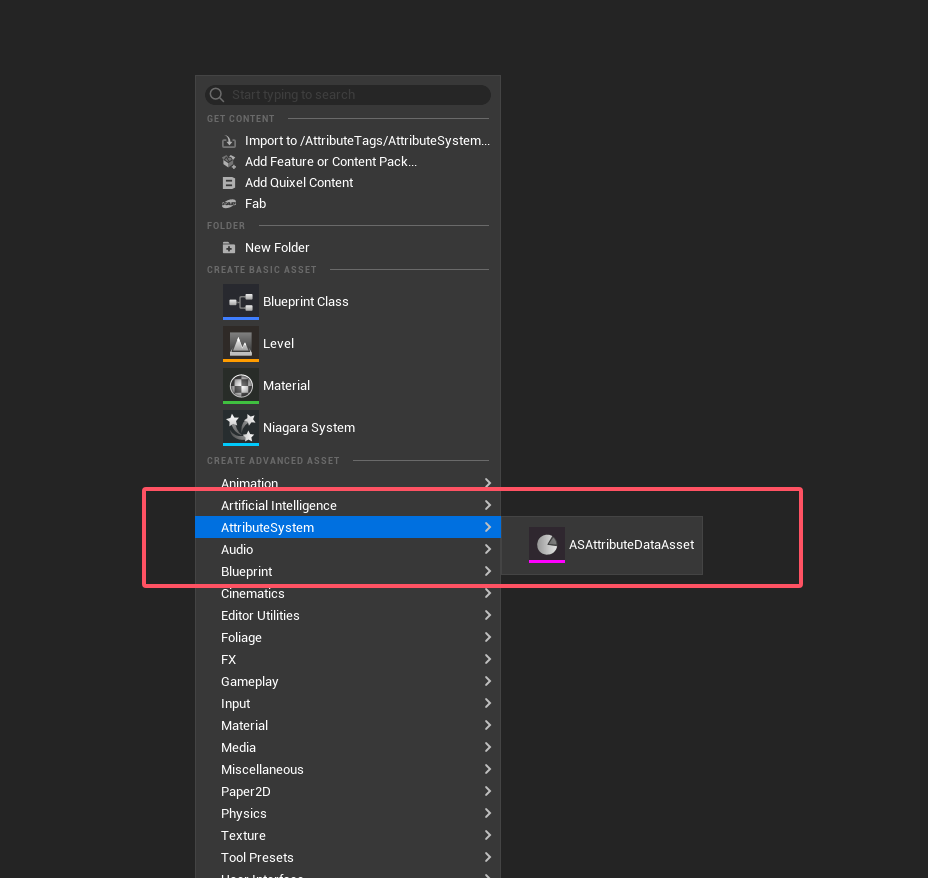
ASAttributeDataAsset Properties
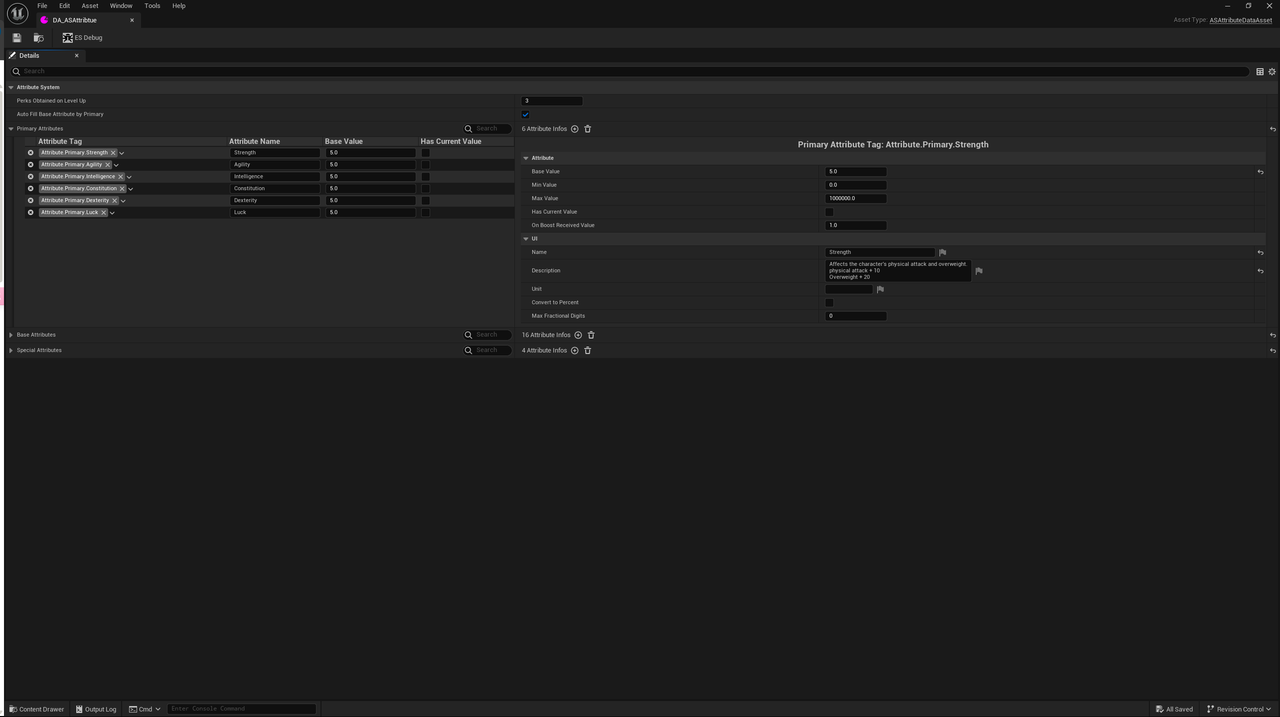
PerksObtainedOnLevelUp
This field is used to set the number of attribute points gained each time the level increases. You can increase the value of a primary attribute (Primary) by consuming attribute points, while changing the value of a base attribute (Base) or special attribute (Special).
bAutoFillBaseAttributeByPrimary
Use primary attributes to automatically populate the selectable options in the basic attribute list. If checked, when you edit a primary attribute, base attributes or special attributes will be automatically populated based on the attribute relationship list. If true, this happens when you edit a primary attribute; if false, nothing will happen
PrimaryAttributes
This is where you configure primary attributes.

This is a list structure; on the left is the basic information of the attribute, including:
AttributeTag: This is the GameplayTag you added in .
AttributeName: This is a UI property, a field used to display the attribute's name in the UI.
BaseValue: The base value of the attribute.
HasCurrentValue: Whether the attribute has a current value. (This is useful for health, mana, energy, stamina, shields, etc.)
You can select a row on the left to edit other fields of the attribute.
BaseValue: Same as the BaseValue above (the same field).
MinValue: The minimum value of the attribute in the game.
MaxValue: The maximum value of the attribute in the game.
HasCurrentValue: Same as the HasCurrentValue above (the same field).
OnBoostReceivedValue: The default value is 1, meaning when increasing an attribute through attribute points, how many attribute points can be added per 1 attribute point. That is, there is a mechanism where players can use attribute points to increase attributes. This parameter determines what value is added to the base value when increasing.
Name: Same as the AttributeName above (the same field).
Description: Some description of this attribute, which can better indicate to users what this attribute does. You can leave it blank (if this attribute does not need to be displayed in the UI or does not need a tooltip).
Unit: The unit used to display the attribute, such as % for critical hit rate, seconds for attack speed, etc.
ConvertToPercent: Whether to convert the attribute to a percentage display?
MaxFractionalDigits: The maximum number of decimal places retained for the value. 0 - 100; 2 - 100.57; 4 - 100.7564
Note: For the three fields Unit / ConvertToPercent / MaxFractionalDigits, you can use the attribute instance's ConvertToText to directly obtain the attribute value text to be displayed. When HasCurrentValue is true, the following fields will appear: These fields are related to regeneration, and the function description is: For example, if the Health attribute has HasCurrentValue set to true and RegenerateAttributeTag set to HealthRegeneration, then at runtime, Health will increase its value according to the attribute value of HealthRegeneration at the frequency of RegenTickInterval. If health is damaged, regeneration will be paused, and regeneration processing will restart after the AttributeRegenCoolDown time.
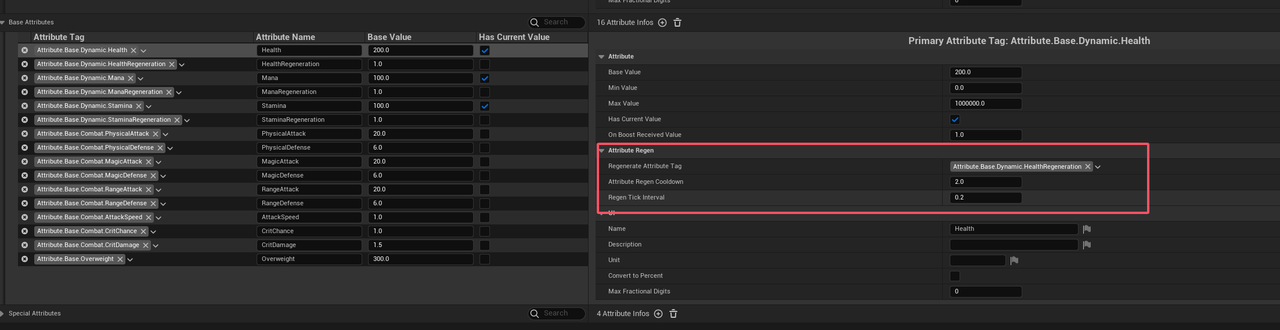
RegenerateAttributeTag: If valid, the attribute will create a regeneration handler to regenerate the attribute value through the attribute value of the attribute Tag configured here.
AttributeRegenCoolDown: Attribute regeneration cooldown; each time the current attribute value is updated, attribute regeneration will be interrupted and allowed to continue after the cooldown.
RegenTickInterval: Regeneration processing interval.
BaseAttributes and SpecialAttributes
The configuration is the same as PrimaryAttributes, so it is not repeated here.
Comments
Share your thoughts and discuss with everyone